How to Change Your Pension Fund on Pension App
Last Updated: 02/12/2025 15:43A Simple Way to Take Control of Your Pension
At Pension App, your pension is invested in one of four BlackRock MyMap funds, each offering a different investment approach:
Ultra-Cautious – our lowest-risk option.
Cautious – a lower-risk option.
Balanced – a mix of stability and growth.
Adventurous – a higher-risk, growth-focused option.
One of the benefits of using Pension App is that you can switch between these fund options directly in your account. There’s no paperwork or phone calls needed - just a few clicks from your dashboard. Once you make a change, the switch can take up to two weeks to process, as it involves the buying and selling of assets.
We’ll show you how to request the switch in this simple step-by-step guide.
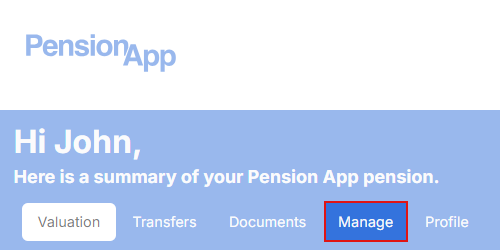
Step 1: Log in and Head to the 'Manage' Tab
Start by logging in to your Pension App account. From the home screen, tap on the ‘Manage’ option from the navigation bar. This will open the section where you can review and adjust your pension settings.
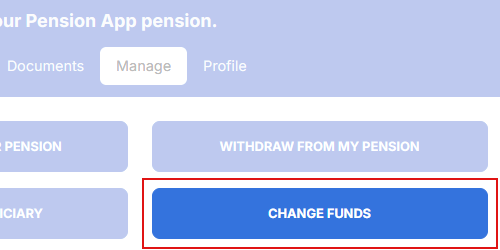
Step 2: Select 'Change Funds'
On the next page, you’ll see a range of account options. Tap on ‘Change Funds’ to begin the process.
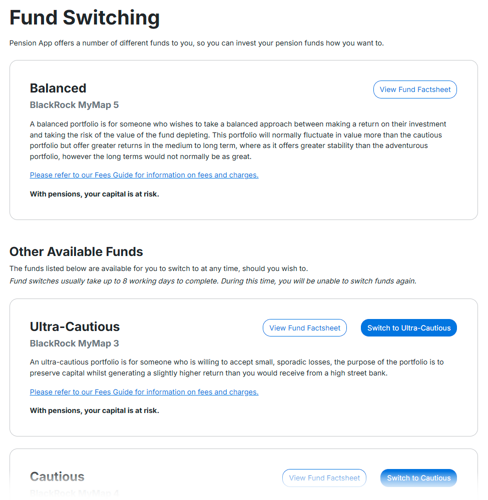
Step 3: View and Select Your New Fund
Your current fund will appear at the top of the screen. Below, you’ll see the other fund options available to switch to and more information about them. If you’d like to change, simply select your preferred option.
Please note: If you already have a fund switch in progress, you won’t be able to make another change until the current switch has been completed.
Step 4: Fund Switch Processing Time
Once your request has been submitted, the switch can take up to two weeks to complete. This is because it involves the buying and selling of investment assets. You won’t see a status update while the switch is in progress, but your new fund will appear in your account once the change is complete.
That’s It
Changing your pension fund through Pension App is straightforward and secure. Whether you’re exploring your options or just want to understand how the process works, everything can be managed from your account.
With pensions, your capital is at risk.